What Is Kafka? A Simple Guide to Apache Kafka for Beginners (With Real Examples)
On this page
Overview
If you've searched for "What is Kafka?", "Kafka explained simply", or "Kafka vs RabbitMQ vs SQS", this guide is for you. This is a beginner-friendly explanation of Apache Kafka with real examples and practical architecture guidance.
1) The Problem Kafka Solves (In Real Life)
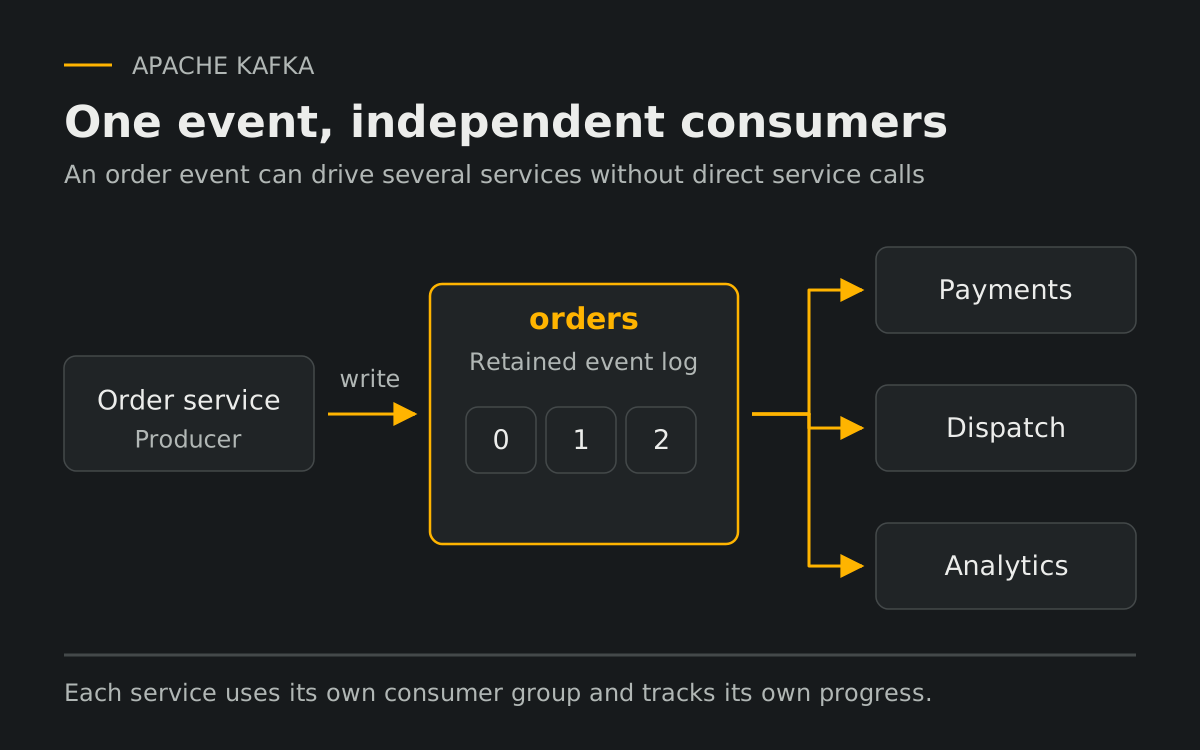
Consider an online food delivery application. A single order creation event must trigger payment, restaurant dispatch, courier assignment, notifications, and analytics pipelines. If each service calls each other directly over HTTP, latency coupling and failure propagation appear immediately.
- One slow dependency can block the entire user flow.
- One unavailable service can fail the order path.
- Adding a new consumer forces upstream service changes.
- Crashes during processing can lead to event loss.
Kafka decouples producers and consumers. A producer publishes an event, and multiple consumer groups can process it independently and asynchronously. Reliable publication still needs an explicit failure-handling strategy, such as an outbox when coordinating a database write with an event.
2) What Is Apache Kafka?
In plain terms, Kafka is a distributed event streaming platform that stores and streams events reliably at high scale. It is both a message broker and a durable distributed log built for throughput, horizontal scale, and fault tolerance.
Unlike traditional queues, Kafka does not delete messages immediately after consumption by default. It retains events based on policy, enabling replay and independent consumption by multiple services.
3) Core Concepts
3.1 Topic
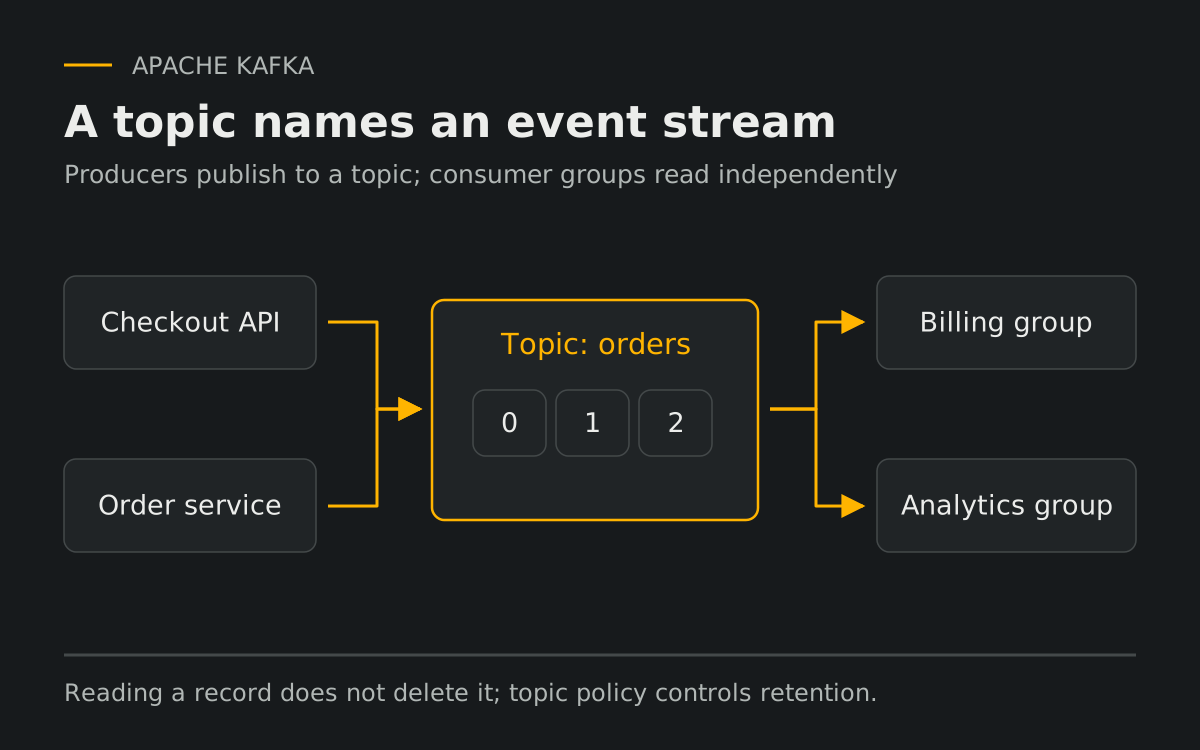
A topic is a named stream of events such as orders, payments, or user_activity. Producers write to topics, consumers read from topics.
3.2 Partition
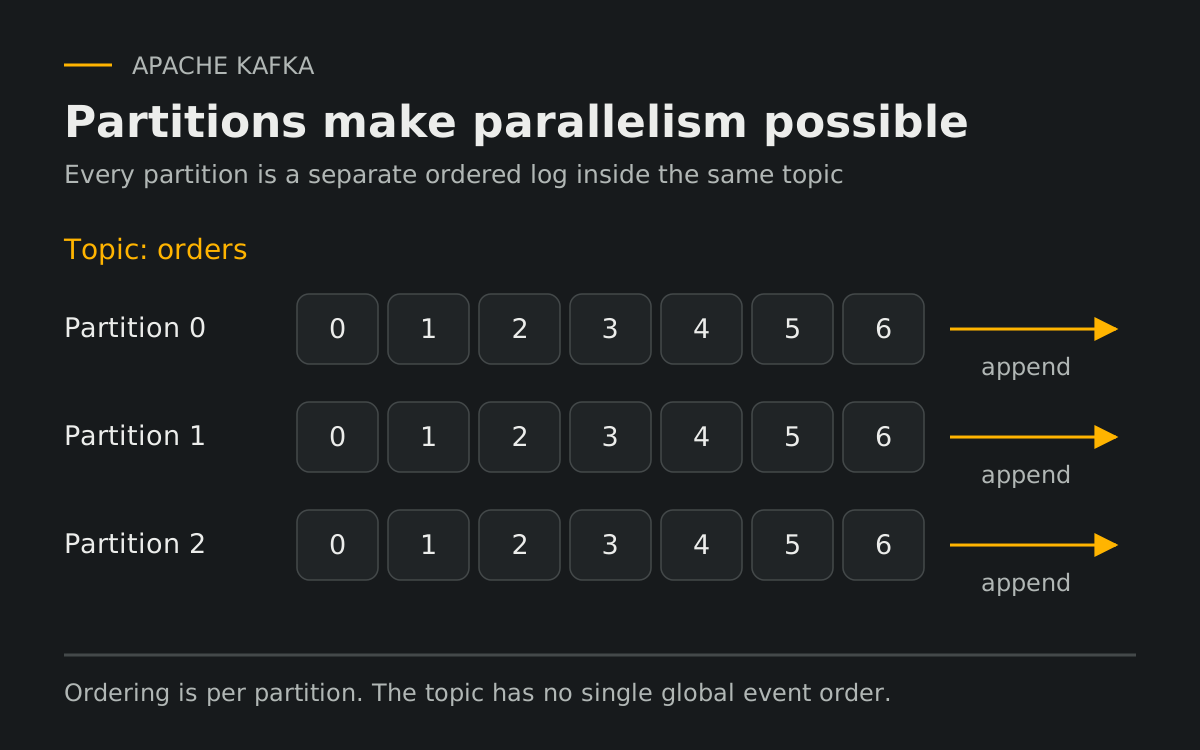
Each topic is split into partitions. A partition is an ordered append-only log. Partitions allow parallelism and throughput scaling. Kafka guarantees order only within a single partition.
3.3 Offset
Each record has an offset within its partition. A consumer has a current position, identifying the next record returned by poll(), and a committed restart position. Internal prefetching can run ahead of the consumer position. A committed offset identifies the next position to read, so committing 3 means offsets below 3 are treated as complete. Offsets can have gaps.
Offset 0
Offset 1
Offset 2
Offset 3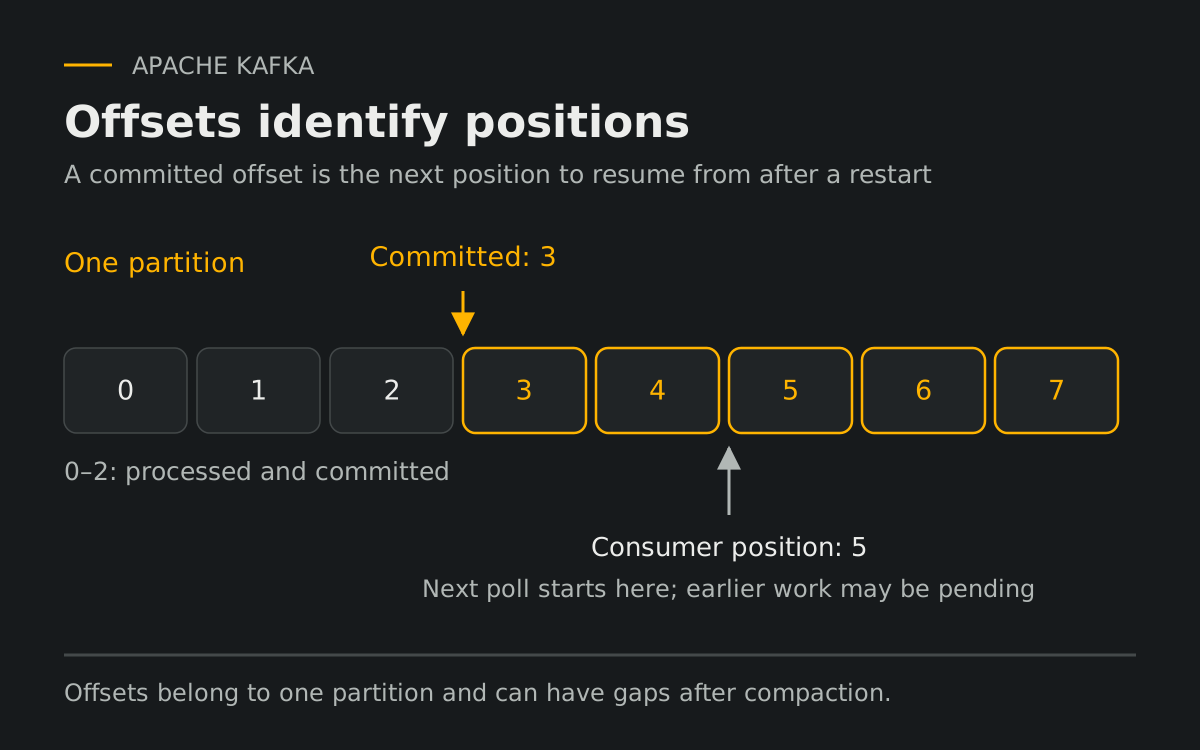
Technical Breakdown
4) How Kafka Works Under the Hood
- Producer sends an event to a topic.
- The producer selects a partition using a key, an explicit partition, or its partitioning strategy.
- Event is appended to the partition log.
- Event is replicated based on topic settings.
- Consumers read later at their own pace.
Producer and consumer are decoupled in time. Producers do not block on downstream processing completion.
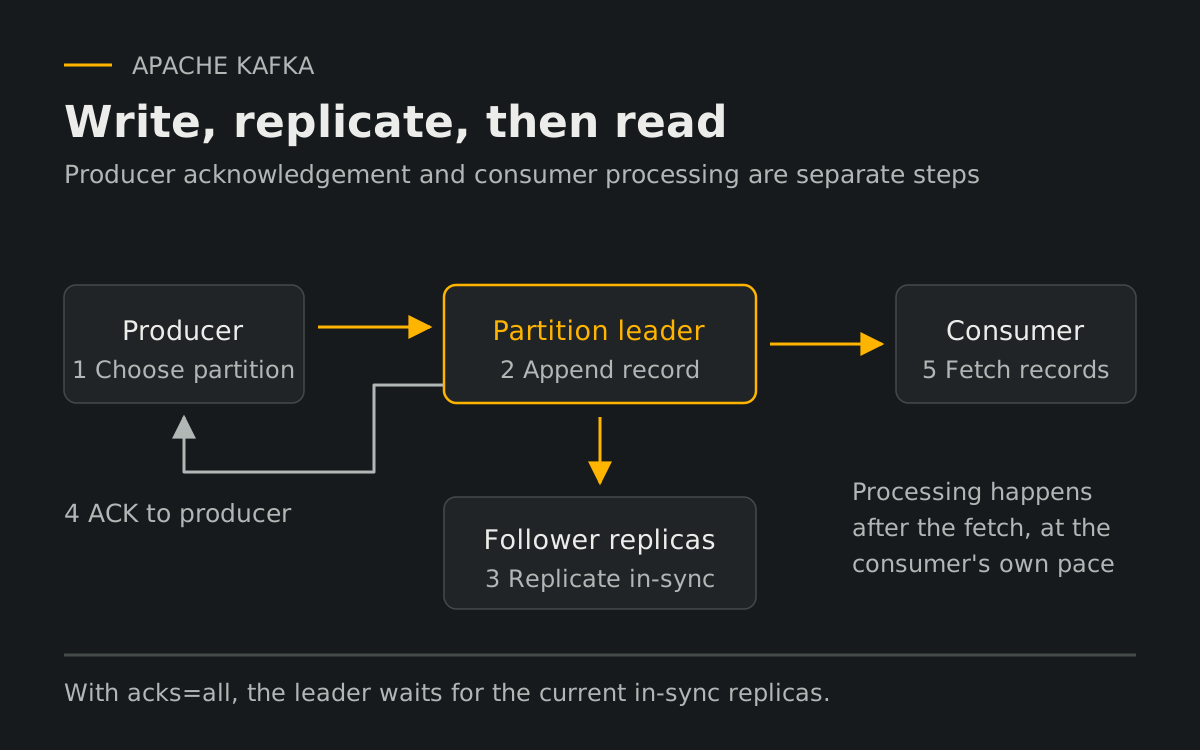
See the Apache Kafka introduction for topics, partitions and independent consumers.
5) Why Kafka Is Fast
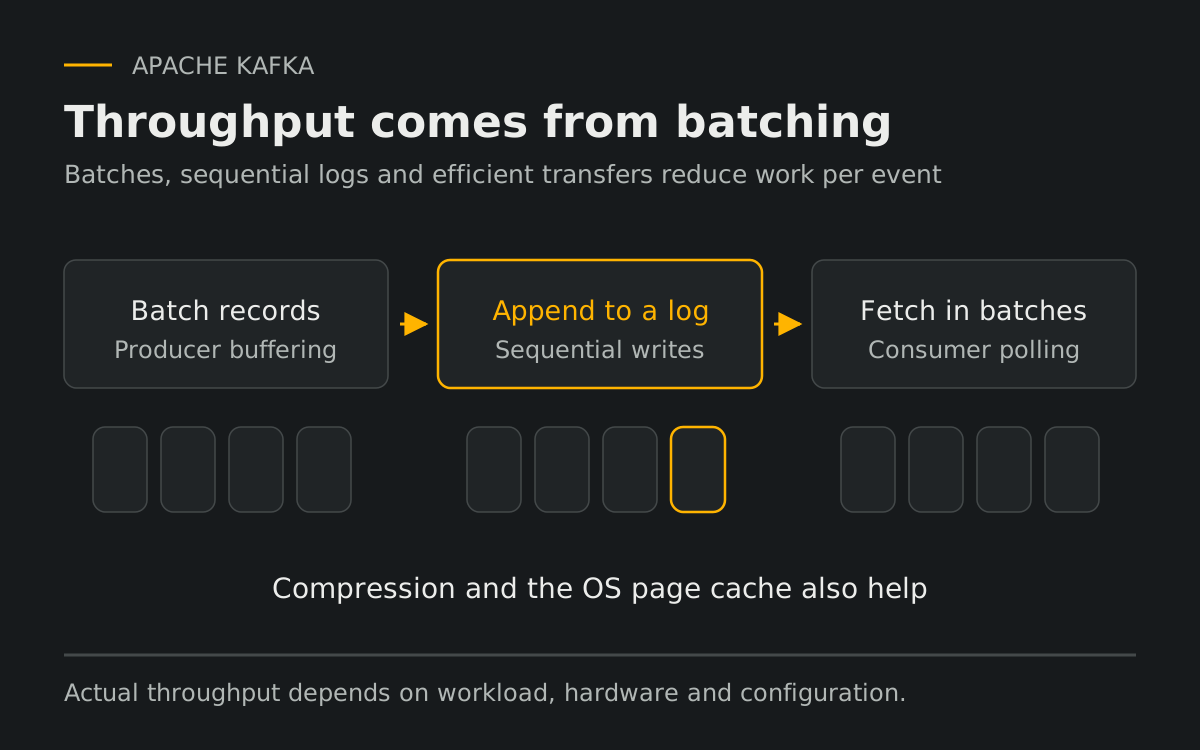
Kafka favors append-only logs, sequential disk I/O, page cache usage, and efficient transfer paths. The implementation is tuned for very high throughput under sustained load.
6) Replication and Fault Tolerance
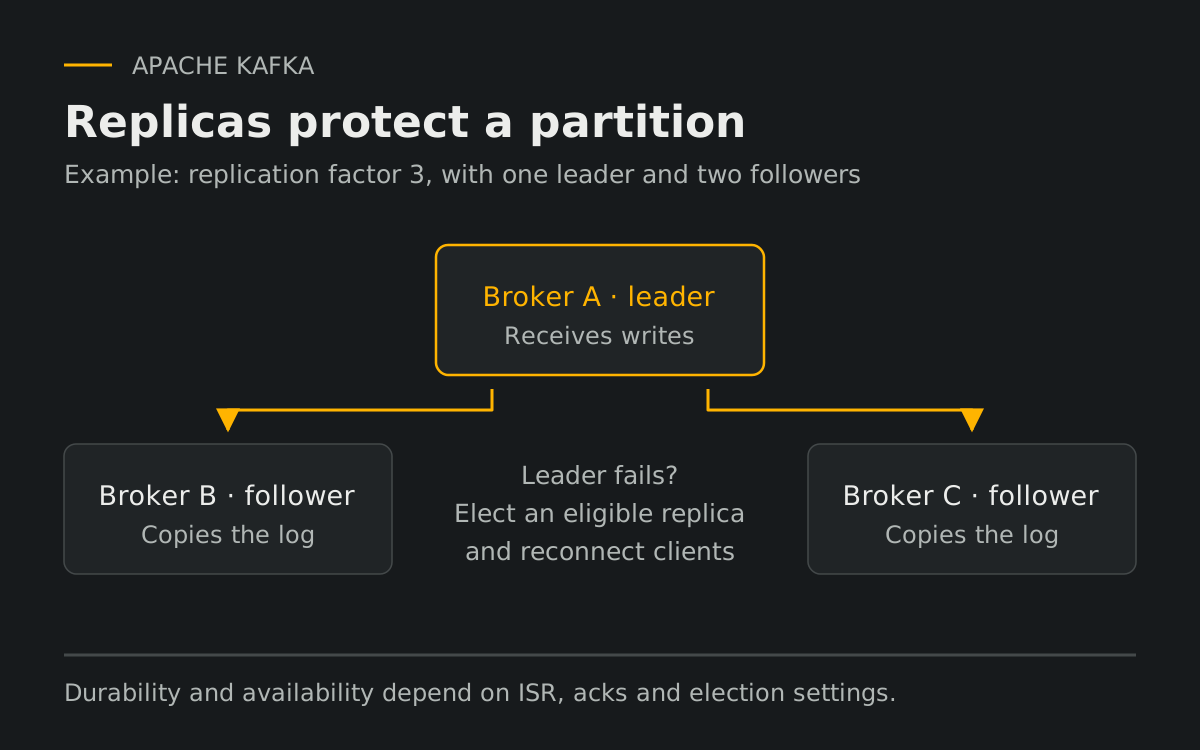
A partition has a leader and, when the replication factor is greater than one, follower replicas. After leader failure, an eligible replica can take over. Availability and durability depend on replica health, producer acknowledgements, minimum in-sync replicas, and election settings; failover can temporarily pause traffic.
7) Consumer Groups and Parallelism
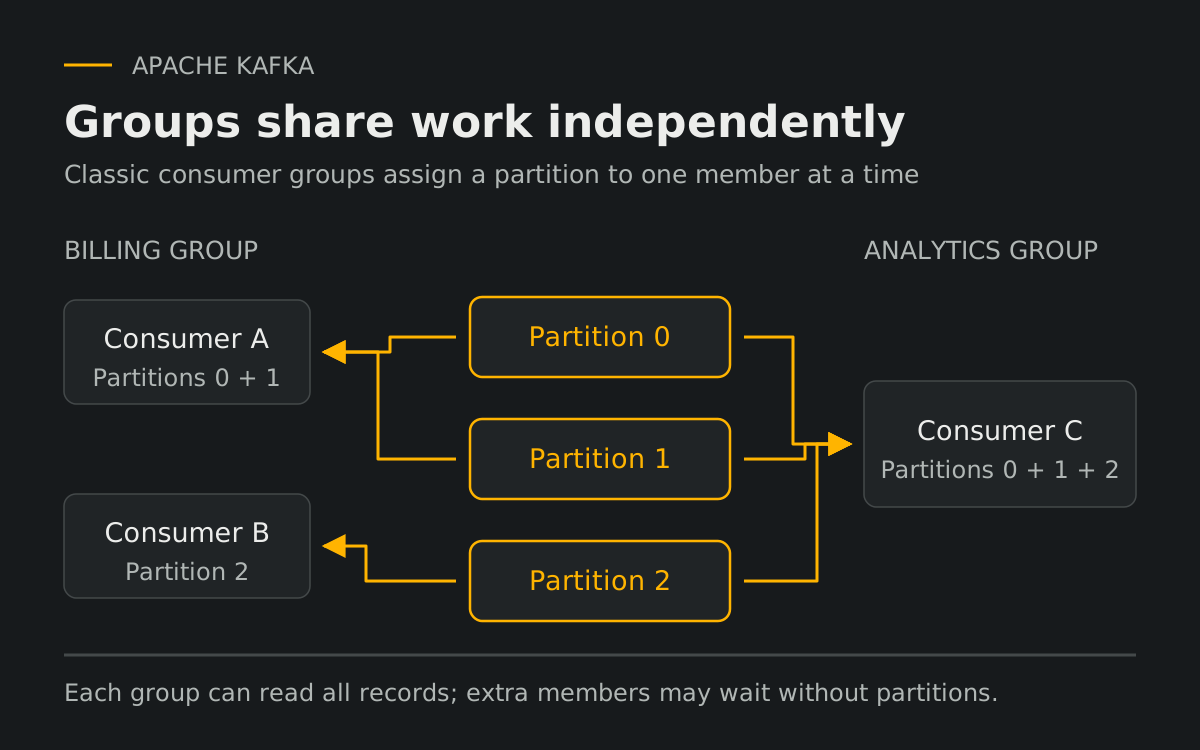
In a classic consumer group, each partition is assigned to at most one member at a time. Different groups read independently. Adding consumers increases assignment parallelism up to the number of partitions; extra members may remain idle. Kafka share groups use a different work-sharing model.
8) Back Pressure and Lag
When consumers fall behind, the retained log buffers a backlog and lag grows. For a group, committed-offset lag is the distance from its committed position to the log end. Consumers must catch up before required data expires, and brokers still need sufficient storage and ingestion capacity.
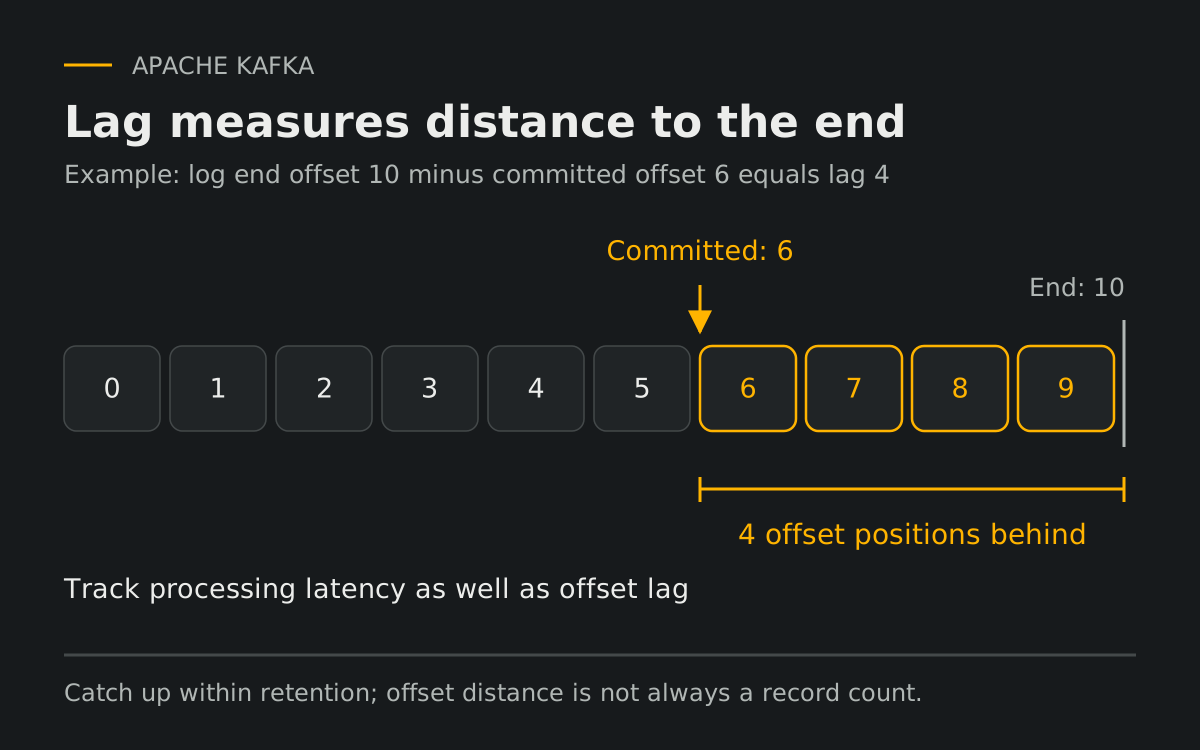
The Kafka consumer API distinguishes the consumer position from committed offsets. The topic settings document retention and minimum ISR.
9) Delivery Guarantees
At most once: advancing the offset before processing can skip work after a crash.
At least once: processing before committing can repeat work after a crash. Durability still depends on publication and retention settings.
Exactly once: Kafka transactions can commit Kafka output records and input offsets together. Downstream consumers need read_committed. External databases and APIs require their own coordination or idempotency.
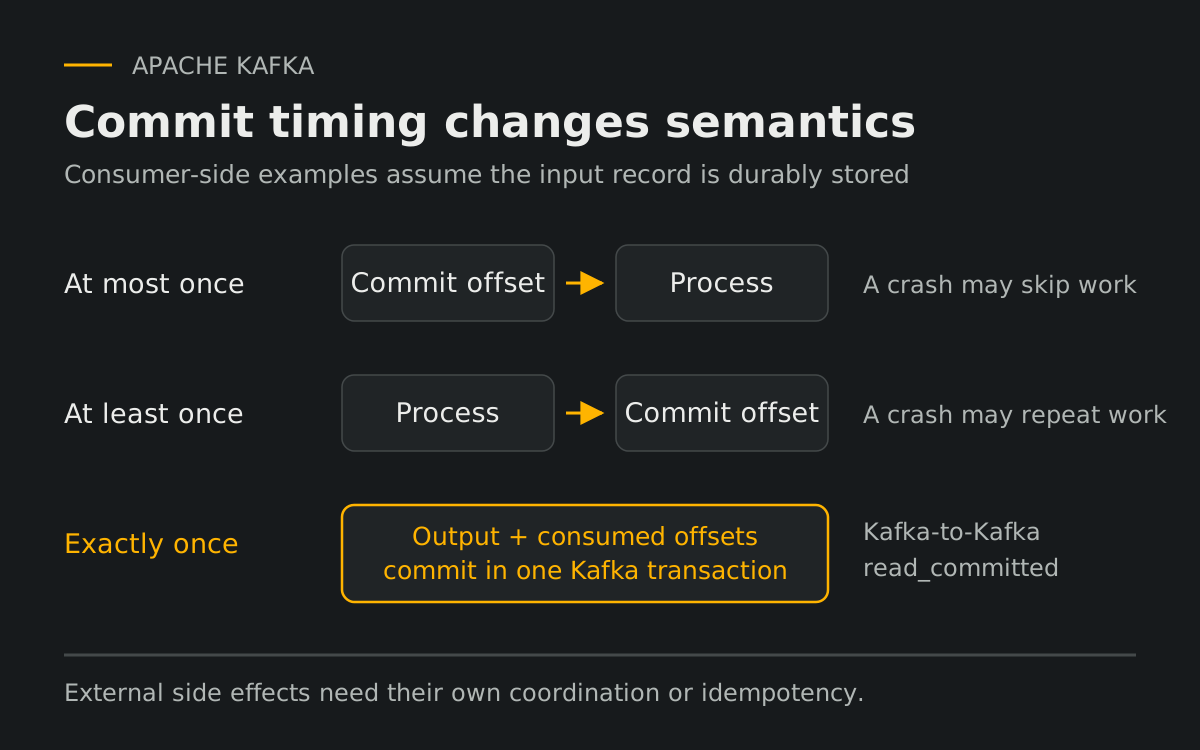
See Kafka delivery semantics and transactions and the producer configuration for the boundaries of these guarantees.
10) Why Duplicates Happen
A lost acknowledgement can make a producer retry a write that already succeeded. With producer idempotence enabled, Kafka deduplicates those producer retries. Application-level resends, duplicate business events, and consumer reprocessing still need separate handling.
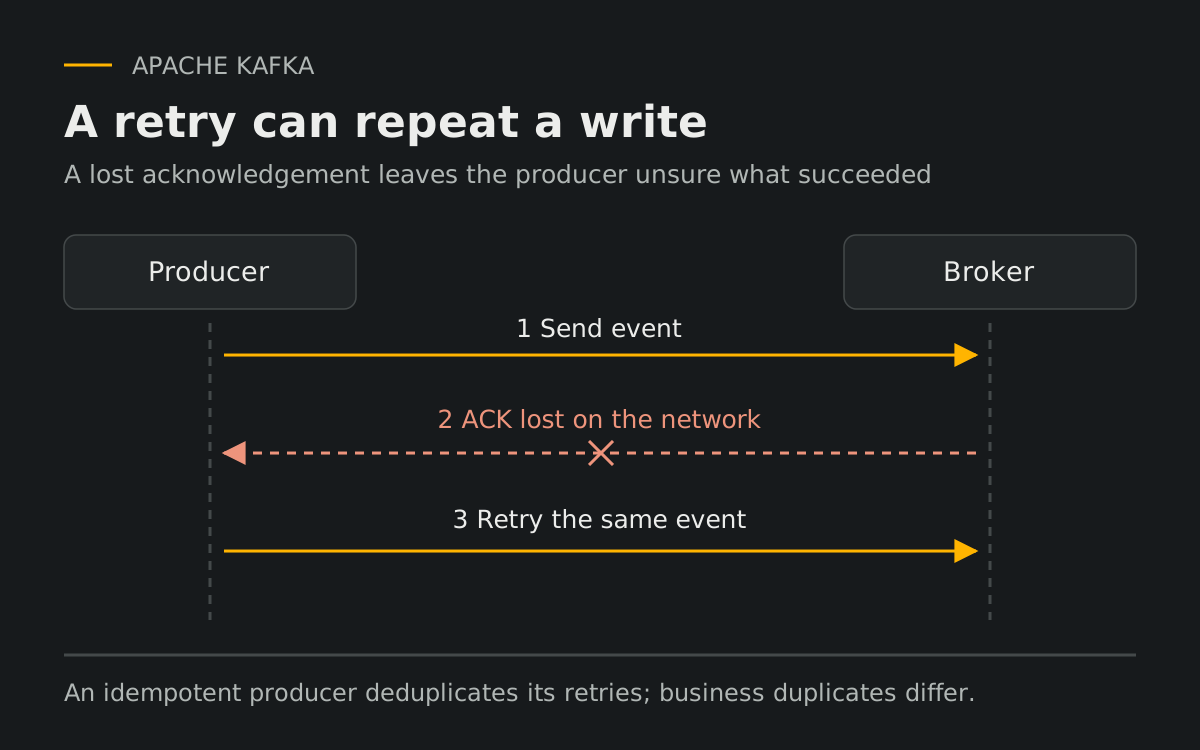
11) Idempotency and Deduplication
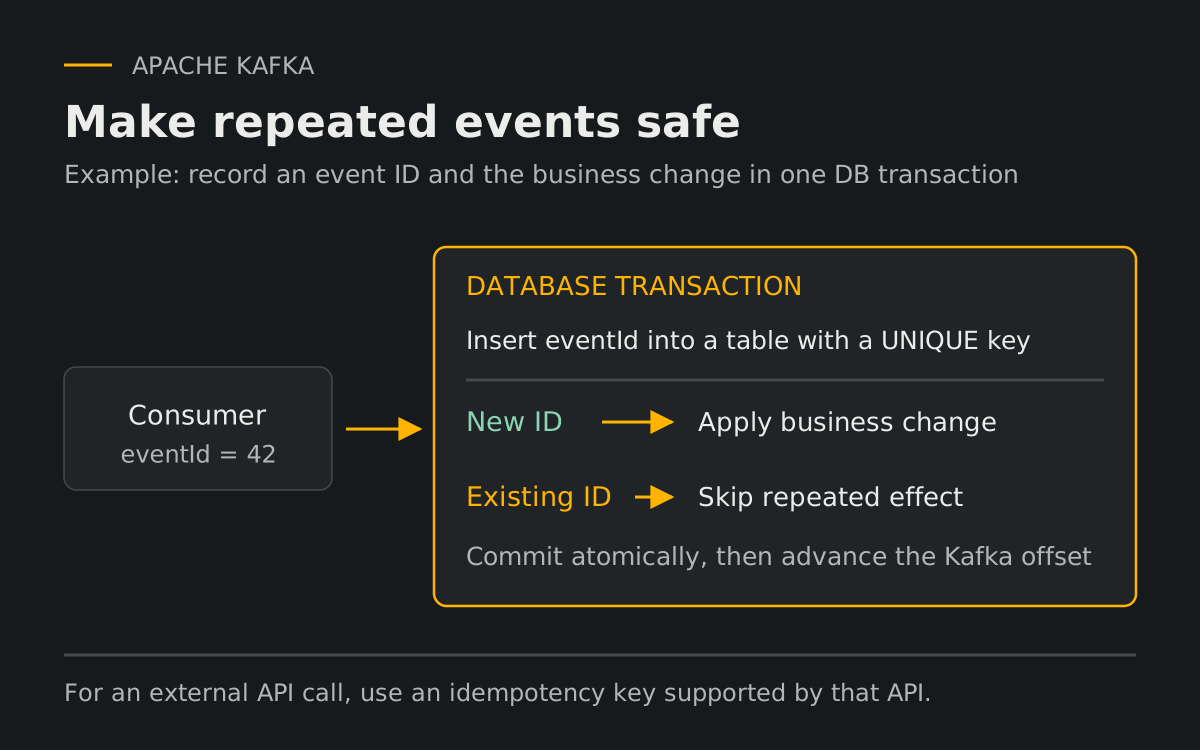
Design consumers so processing the same event again preserves the intended final state. One database pattern is a unique event-ID record committed atomically with the business update, followed by the Kafka offset commit. For an external API, use its supported idempotency key; a separate check-then-write is not atomic.
Key Takeaways
12) Message Keys and Ordering
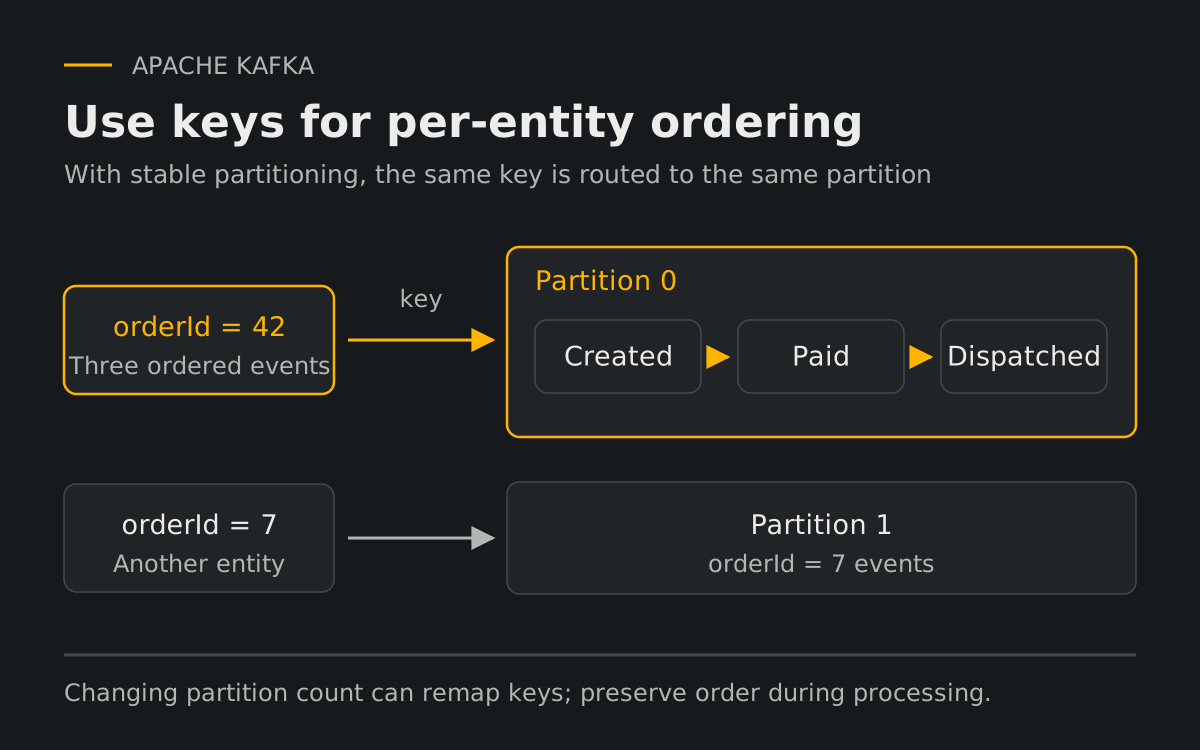
For per-entity ordering, use a stable key such as orderId with consistent partitioning. The same key maps to the same partition while the partition count and partitioning strategy remain unchanged. Producer retry configuration and consumer-side parallel work must also preserve the order you require.
13) Dead Letter Queue (DLQ)
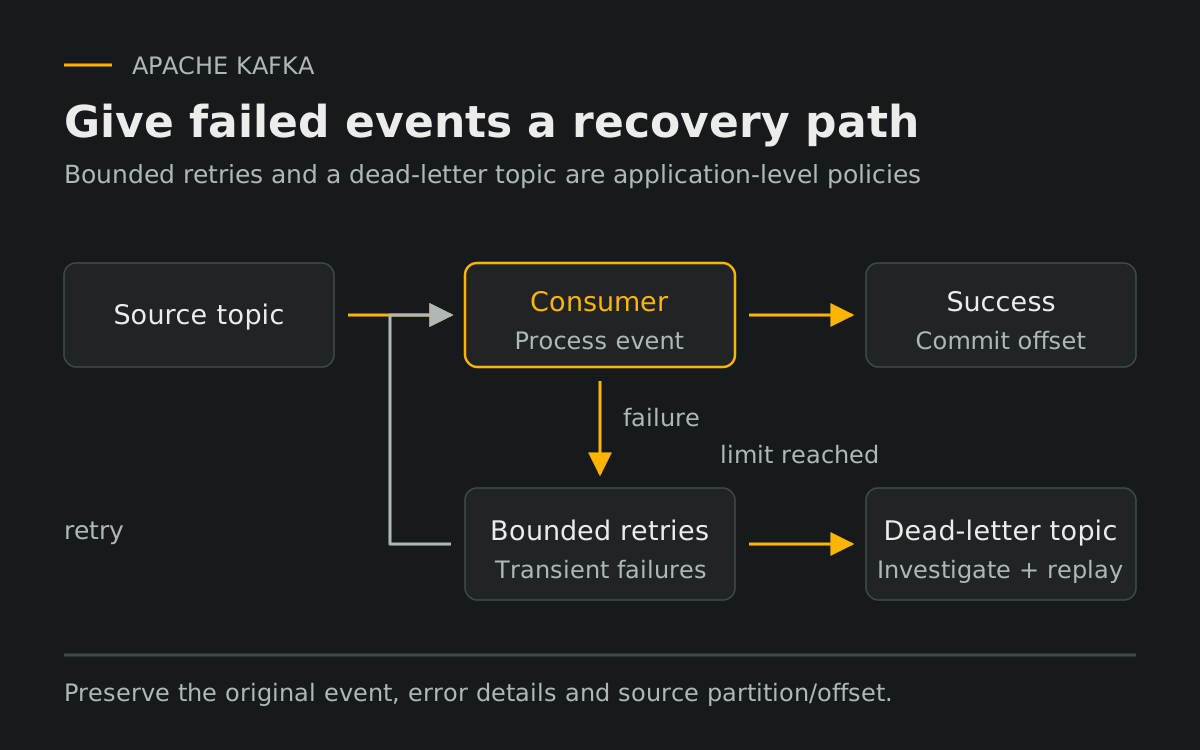
An application or connector can route events that exceed a bounded retry policy to a dead-letter topic. Preserve the original event, failure details, and source position for investigation and controlled replay. Coordinate the DLQ write and source offset to avoid losing failed events; skipping them may affect business ordering.
14) Kafka vs Redis vs RabbitMQ vs AWS SQS
- Redis: Pub/Sub is live messaging without stored history. Redis Streams stores entries and supports replay and consumer groups; persistence and replication settings matter.
- RabbitMQ: queues support routing and task distribution. RabbitMQ Streams adds a replicated append-only log with retention and replay, so compare the specific mode you would deploy.
- AWS SQS: a managed queue with visibility timeouts and explicit deletion. Standard and FIFO queues have different ordering and deduplication behavior.
- Kafka: multi-subscriber replayable streams with high throughput and durable history.
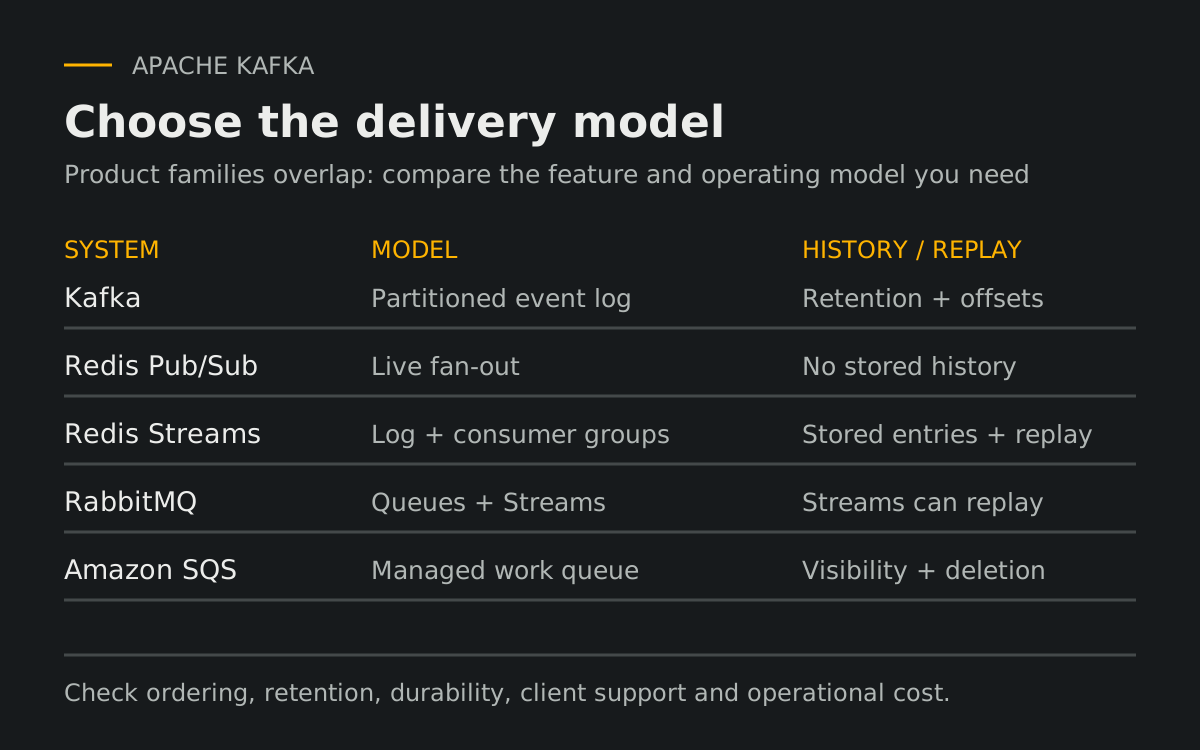
Compare the official documentation for Redis Streams, RabbitMQ Streams, and SQS queue types before choosing a delivery model.
Common Misconceptions
All Kafka consumers share one queue: classic consumer groups share partitions within a group; separate groups read independently.
Kafka deletes after read: false. Retention policy controls data lifecycle.
Exactly once means duplicates can never happen anywhere: false without proper transactional boundaries.
When to Use Kafka
Choose Kafka when multiple systems react to shared events, you need buffering, replay, high throughput, and event-driven architecture patterns.
Avoid Kafka when you only need a simple low-volume queue and operational complexity is unjustified.
Mini Glossary
Broker: Kafka server.
Topic: named event stream.
Partition: ordered log segment inside a topic.
Offset: message position in a partition.
Consumer Group: consumers sharing work.
Lag: offset distance to the log end; distinguish the consumer position from committed processing progress.
Idempotency: safe duplicate reprocessing.
Final Summary
Kafka combines retained event storage, partitioned processing, replication, and independent consumers. Choose it when those capabilities justify the operational work.
Kafka stores event history so independent consumer groups can read and replay it within the retention window.